


Weather & Radar USA - Pro
4.483.00 Reviews
App Specs
- Version
- 2026.5
- Updated On
- License
- $30.99
- Downloads
- 100,000+
- Developer
- WetterOnline
- Categories
- Weather
- Platform
- Android, iOS
Screenshots
 Analysis by AppCompare
If you're anything like me, you're constantly checking the weather before heading out. Whether you're planning a weekend hike or just trying to dodge the rain on your way to work, having a reliable weather app is a must. Enter Weather & Radar USA - Pro, an app that promises to keep you one step ahead of Mother Nature. I've taken this app for a spin, and here's what I found.
First Impressions
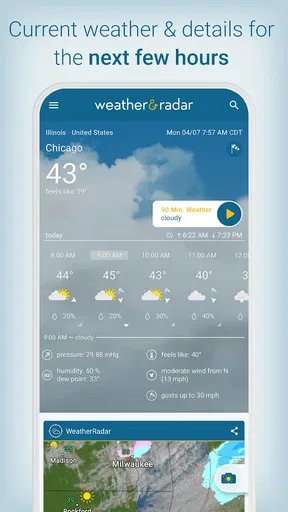
Upon launching Weather & Radar USA - Pro, the first thing I noticed was its clean and intuitive interface. No clutter, just the essentials right where you need them. The main screen displays the current temperature, a brief weather description, and a neat little icon that perfectly captures the mood outside. It's simple, straightforward, and easy on the eyes.
Navigation is a breeze. The bottom tab menu gives you quick access to the radar, hourly forecast, and 14-day outlook. One tap, and you can dive into detailed weather insights without any fuss. I particularly liked how everything is laid out logically, making it user-friendly even for those who aren't tech-savvy.
Features That Stand Out
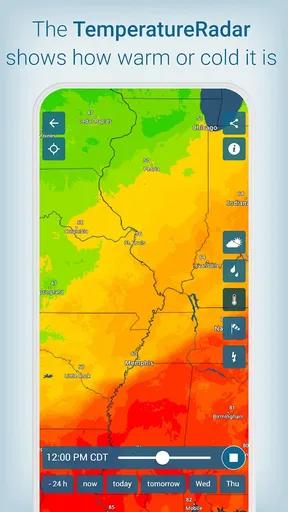
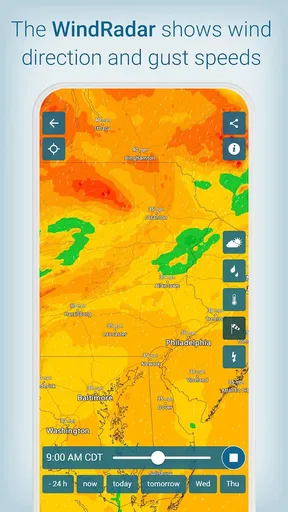
Now, let's talk features. The real star of the show is, of course, the radar. It's super detailed and updates in real-time, allowing you to track storms, rain, and even snow with precision. The color-coded system makes it easy to identify different weather conditions at a glance.
"The radar is a game-changer, especially if you're planning outdoor activities. It's like having a little meteorologist in your pocket."
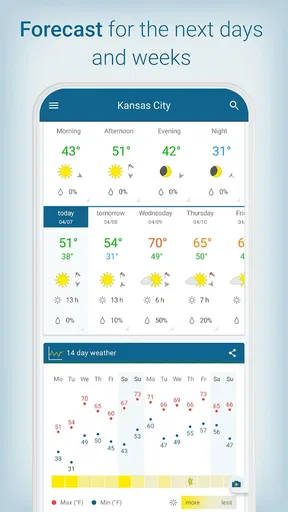
Another feature that caught my attention is the 14-day weather forecast. It's surprisingly accurate and helps you plan your week without any surprises. The app also includes a nifty widget that you can add to your home screen for quick updates. No need to open the app every time you want to check if you need an umbrella!
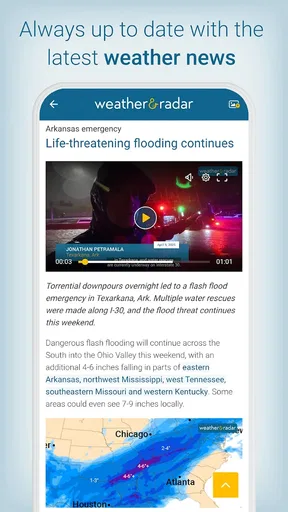
One unique aspect of the app is its focus on local weather news. You can stay informed with the latest weather-related headlines, which is super handy during hurricane season or other severe weather events. It's like having a weather channel right at your fingertips.
Personal Experience
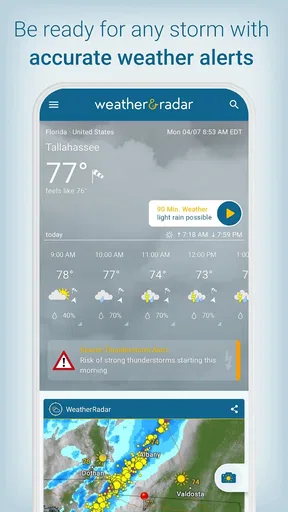
Using the app over a couple of weeks, I found it to be incredibly reliable. The push notifications are a lifesaver. They alert you about significant changes, like sudden temperature drops or incoming storms. This feature has saved me from getting drenched more than once!
Worth Reading Before You Choose

EA SPORTS FC Mobile 26 Is a Bigger Football Game, but It Takes Time

Flipboard Shows What News Apps Must Do Beyond the Feed

Switching to Android Auto Means Rethinking Your Driving Routine

Google Calendar Makes a Crowded Week Easier to Manage

Ludo King Makes the Most of the Minutes Between Plans

Baby Panda World Brings Quick Play to Modern Phones, but Its Game Library Feels Busy
The radar has also been a trusty companion. I was planning a picnic last weekend, and a quick check of the radar revealed a surprise rain shower heading my way. Thanks to the app, I could adjust my plans and avoid a soggy sandwich situation.
Another highlight for me is the air quality index, which is becoming increasingly important. It provides detailed information about pollution levels, which is great for those of us who like to keep an eye on environmental factors.
Making the First Check Useful
For a first-time user, I would start with one simple question: what do I need to decide today? If the answer is whether to carry a rain jacket, the current conditions and hourly forecast are more useful than scrolling through every available view. If I have an outdoor plan later, I move to the radar and look at how precipitation is developing around the place I intend to be. That small habit keeps the app practical rather than turning a quick weather check into a long browsing session.
I also find it helpful to treat the forecast as a planning aid, not a promise. A longer outlook can help me choose which day might be better for a walk or errands, but I would check again closer to the time before making a decision that depends on dry weather. That distinction matters with any weather service: forecasts farther ahead are best for broad planning, while the radar and near-term view are better for deciding what to do in the next few hours.
Setting Up a Routine That Fits
After opening the app, choose the location that matters most to your day and make that the place you check first. If your plans often take you somewhere else, search for that destination when needed instead of assuming the weather at home will match. Conditions can change over a short distance, and a forecast for the wrong town is worse than no forecast at all.
The home-screen widget is useful when I want a quick glance without opening the full interface. I would place it somewhere I naturally look before leaving, then use the app itself when the widget raises a question. A widget is a shortcut, not a replacement for checking the radar before a long drive or outdoor event. If screen space is limited, I would keep it only if I genuinely use it; otherwise, opening the app for a deliberate check is just as simple.
Notifications are another choice worth making deliberately. Alerts can be valuable when a sudden change would affect a commute or outdoor plan, but frequent notices can become background noise if they do not match your needs. I would keep the alerts that help me act and adjust the rest rather than treating every notification as equally urgent. The aim is to have the app interrupt me only when the information is useful.
Reading Radar Without Overreacting
Radar is most useful when I read it as a moving picture, not a guarantee about the exact conditions at my front door. I look at the direction and shape of a precipitation area and compare that with the time I expect to be outside. If a shower is nearby, checking again shortly before leaving gives me a better basis for changing plans than reacting to one isolated snapshot.
This is especially helpful for a picnic, a dog walk, or a short trip across town. A broad forecast may say that rain is possible, while the radar helps me decide whether the risk looks immediate enough to bring a waterproof layer or shift the outing. For a serious safety decision, though, I would also pay attention to official local warnings. A consumer weather app is convenient for everyday awareness, but it should not be the only source I rely on during dangerous conditions.
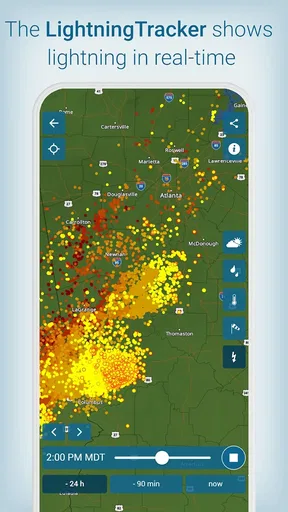
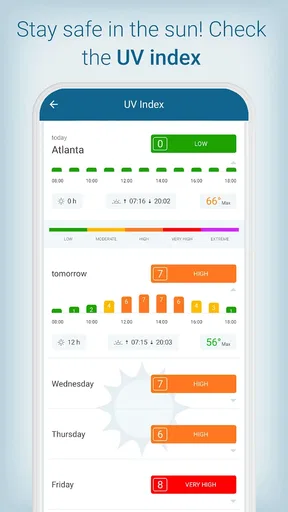
The lightning tracker and UV index give the app other practical uses beyond deciding whether to take an umbrella. Before spending a long time outside, I can check for lightning activity and consider whether sun protection deserves more attention. These details are most valuable when they change what I do: postponing an exposed activity, seeking shelter, or choosing a shaded route. They are less useful if I open them out of habit without connecting the information to a plan.
Where It Fits Among Weather Apps
Compared with a basic weather app that mainly shows a temperature and a daily summary, this one puts more emphasis on visual conditions and short-term decisions. That makes it a better fit for someone who checks moving rain, storms, and changing local conditions rather than wanting only a number for the day. The radar is the strongest reason to choose it, while the widget and alerts help make repeat checks less work.
On the other hand, people who already get all the detail they need from a built-in phone weather app may not gain enough from adding another service. If your routine is simply to check whether it will be hot or cold, a simpler option can be faster and less distracting. Likewise, someone who needs specialized forecasting for a particular outdoor pursuit may prefer an app built around that activity. This one is most convincing as an everyday local-weather companion, not as a replacement for every specialist tool.
There is also a difference between convenience and certainty. The app brings several kinds of weather information together, which saves switching between tools, but no forecast can remove uncertainty from fast-changing conditions. I use the different views to cross-check a decision: the forecast for the general outlook, radar for nearby precipitation, and alerts for changes that might deserve attention. That is more useful than treating any single screen as the final word.
Who Will Get the Most From It
I can see this working particularly well for commuters, parents planning school runs, people who walk or cycle, and anyone who changes outdoor plans around rain. These are situations where a quick check has an immediate payoff. A gardener might use the outlook to think ahead, while someone arranging a weekend outing can compare possible days and revisit the conditions nearer the time.
It is less compelling for someone who rarely checks the weather, dislikes notifications, or wants only a bare-bones temperature display. The interface is approachable, but the value comes from actually using its extra views. If the radar, alerts, widget, lightning information, and UV index would sit untouched, the added detail may not justify choosing it over a simpler alternative.
The app is developed by WetterOnline and is listed in the weather category. It has a 4.4 average from around 58,000 ratings, with more than 100,000 installs. Those figures suggest that it has found an audience, but I would still judge it by whether its local information and tools fit my routine. Popularity alone cannot tell me whether I personally need a radar-focused forecast.
What to Know Before Choosing It
The Pro edition is priced at $30.99, so I would think about how often I will use its weather tools before committing. For someone who checks forecasts daily and relies on radar or alerts to plan, paying for a weather app may feel worthwhile. If I only look at the weather occasionally, I would compare the everyday benefit with what a free or built-in alternative already provides. The key question is not how many features appear on screen, but whether they help me make better decisions often enough to matter.
It is rated for Everyone, and the current version is 2026.5. The app was released on November 4, 2014, and requires operating system version 10 or later. Those details are useful when deciding whether it suits a family device or an older phone, though I would still check that my own device meets the minimum requirement before planning to use it.
One point that can be confusing at first is the difference between a forecast and an alert. A forecast helps me plan around likely conditions; an alert is a prompt to pay attention to a change. I do not assume that having notifications enabled means I can stop checking conditions myself. For a routine commute, a glance at the app before leaving is sensible; for severe weather, I would take official warnings seriously and follow local safety advice.
From Daily Checks to Better Decisions
A realistic routine could be as simple as checking the widget while getting ready, opening the hourly forecast if rain could affect the commute, and using the radar only when timing matters. Before an outdoor gathering, I would check the destination rather than just my current location, then revisit conditions closer to the event. This sequence avoids overplanning days ahead while still giving me time to make a practical adjustment.
For air quality, I would use the index as context when deciding how long to exercise outdoors, especially if I am sensitive to pollution. For UV, I would check before a long stretch in the sun and plan accordingly. Neither detail should be treated as a substitute for personal judgement, but both can make a weather check more useful than simply asking whether it will rain.
Weather apps are easy to compare by the number of screens they offer, but I care more about how quickly I can reach the answer I need. Here, the radar and local alerts give the app a clear purpose. The trade-off is that a richer set of information asks me to make choices about what to follow. I would keep the views that change my plans and ignore the rest rather than feeling obliged to use every feature.
Final Thoughts
Overall, Weather & Radar USA - Pro is a solid choice for anyone looking for a reliable and detailed weather app. It's packed with features that go beyond the basics, providing everything from radar to air quality at your fingertips. The intuitive design and real-time updates make it a breeze to use.
If you're on the hunt for a weather app that doesn't just tell you the temperature but also keeps you informed about changing conditions, this app is worth checking out. Whether you're a weather enthusiast or just someone who wants to stay dry, it has got you covered.
Pros
- Accurate weather forecasts updated hourly.
- Detailed radar maps with zoom feature.
- Customizable weather alerts and notifications.
- Ad-free experience for uninterrupted use.
- Supports multiple locations for travel updates.
Cons
- Requires a paid subscription for full features.
- Heavy data usage for real-time updates.
- Limited offline functionality.
- May lag on older devices.
- No widget customization options.
FAQs for Weather & Radar USA - Pro
What features does Weather & Radar USA - Pro offer?
Weather & Radar USA - Pro provides comprehensive weather forecasts, including real-time radar images, hourly updates, and detailed reports on temperature, wind speed, and precipitation. The app also offers severe weather alerts, interactive maps, and a customizable widget for quick access to weather conditions.
Is the app ad-free with the Pro version?
Yes, the Pro version of Weather & Radar USA is ad-free. This means you can enjoy uninterrupted access to weather updates and radar information without any distracting advertisements, providing a cleaner and more focused user experience.
Can I use Weather & Radar USA - Pro offline?
Weather & Radar USA - Pro requires an internet connection to update weather data and radar images. However, once the data is downloaded, you can view the latest information offline. For real-time updates and accurate forecasts, staying connected is recommended.
How accurate are the weather forecasts provided by the app?
The app uses advanced meteorological data from reliable sources to provide accurate and timely weather forecasts. While no weather forecast can be perfect, users generally find Weather & Radar USA - Pro to be highly reliable, especially for short-term forecasts and severe weather alerts.
Is the app suitable for international users?
While Weather & Radar USA - Pro primarily focuses on U.S. weather conditions, it does provide some international forecasts. However, the app's most comprehensive features, like detailed radar images and severe weather alerts, are optimized for users within the United States.


